# grok2api
**Repository Path**: leegle/grok2api
## Basic Information
- **Project Name**: grok2api
- **Description**: Grok2API 是一个基于 FastAPI 构建的 Grok 网关,支持将 Grok Web 能力以 OpenAI 兼容 API 的方式转换。
- **Primary Language**: Unknown
- **License**: MIT
- **Default Branch**: main
- **Homepage**: None
- **GVP Project**: No
## Statistics
- **Stars**: 0
- **Forks**: 0
- **Created**: 2026-05-18
- **Last Updated**: 2026-05-19
## Categories & Tags
**Categories**: Uncategorized
**Tags**: None
## README
 [](https://www.python.org/)
[](https://fastapi.tiangolo.com/)
[](pyproject.toml)
[](LICENSE)
[](docs/README.en.md)
[](https://deepwiki.com/chenyme/grok2api)
[](https://blog.cheny.me/blog/posts/grok2api)
> [!NOTE]
> 本项目仅供学习与研究交流。请务必遵循 Grok 的使用条款及当地法律法规,不得用于非法用途!二开与 PR 请保留原作者与前端标识。
[](https://www.python.org/)
[](https://fastapi.tiangolo.com/)
[](pyproject.toml)
[](LICENSE)
[](docs/README.en.md)
[](https://deepwiki.com/chenyme/grok2api)
[](https://blog.cheny.me/blog/posts/grok2api)
> [!NOTE]
> 本项目仅供学习与研究交流。请务必遵循 Grok 的使用条款及当地法律法规,不得用于非法用途!二开与 PR 请保留原作者与前端标识。
Grok2API 是一个基于 **FastAPI** 构建的 Grok 网关,支持将 Grok Web 能力以 OpenAI 兼容 API 的方式转换。核心特性:
- OpenAI 兼容接口:`/v1/models`、`/v1/chat/completions`、`/v1/responses`、`/v1/images/generations`、`/v1/images/edits`、`/v1/videos`、`/v1/videos/{video_id}`、`/v1/videos/{video_id}/content`
- Anthropic 兼容接口:`/v1/messages`
- 支持流式与非流式对话、显式思考输出、函数工具结构透传,以及统一的 token / usage 统计
- 支持多账号池、层级选号、失败反馈、额度同步与自动维护
- 支持本地缓存图片、视频与本地代理链接返回
- 支持文生图、图像编辑、文生视频、图生视频
- 内置 Admin 后台管理、Web Chat、Masonry 生图、ChatKit 语音页面
## 服务架构
```mermaid
flowchart LR
Client["Clients\nOpenAI SDK / curl / Browser"] --> API["FastAPI App"]
subgraph Products["Products"]
direction TB
OpenAI["OpenAI APIs\n/v1/*"]
Anthropic["Anthropic APIs\n/v1/messages"]
Web["Web Products\n/admin /webui/*"]
end
subgraph Control["Control"]
direction TB
Models["Model Registry"]
Accounts["Account Services"]
Proxies["Proxy Services"]
end
subgraph Dataplane["Dataplane"]
direction TB
Reverse["Reverse Protocol + Transport"]
AccountDP["AccountDirectory"]
ProxyDP["Proxy Runtime"]
end
subgraph Platform["Platform"]
direction TB
Tokens["Token Estimation"]
Storage["Storage"]
Config["Config Snapshot"]
Auth["Auth"]
Log["Logging"]
end
API --> OpenAI
API --> Anthropic
API --> Web
OpenAI --> Models
OpenAI --> AccountDP
OpenAI --> ProxyDP
OpenAI --> Reverse
OpenAI --> Tokens
OpenAI --> Storage
Anthropic --> Models
Anthropic --> AccountDP
Anthropic --> ProxyDP
Anthropic --> Reverse
Anthropic --> Tokens
Web --> Accounts
Web --> Config
Web --> Auth
Accounts --> AccountDP
Proxies --> ProxyDP
Models --> Reverse
```
## 快速开始
### 本地部署
```bash
git clone https://github.com/chenyme/grok2api
cd grok2api
cp .env.example .env
uv sync
uv run granian --interface asgi --host 0.0.0.0 --port 8000 --workers 1 app.main:app
```
### Docker Compose
```bash
git clone https://github.com/chenyme/grok2api
cd grok2api
cp .env.example .env
docker compose up -d
```
### Vercel
[](https://vercel.com/new/clone?repository-url=https://github.com/chenyme/grok2api&env=LOG_LEVEL,LOG_FILE_ENABLED,DATA_DIR,LOG_DIR,ACCOUNT_STORAGE,ACCOUNT_REDIS_URL,ACCOUNT_MYSQL_URL,ACCOUNT_POSTGRESQL_URL)
### Render
[](https://render.com/deploy?repo=https://github.com/chenyme/grok2api)
### 首次启动
1. 修改 `app.app_key`
2. 设置 `app.api_key`
3. 设置 `app.app_url`(否则图片、视频的链接会 403 无权访问)
## WebUI
### 页面入口
| 页面 | 路径 |
| :-- | :-- |
| Admin 登录页 | `/admin/login` |
| 账号管理 | `/admin/account` |
| 配置管理 | `/admin/config` |
| 缓存管理 | `/admin/cache` |
| WebUI 登录页 | `/webui/login` |
| Web Chat | `/webui/chat` |
| Masonry | `/webui/masonry` |
| ChatKit | `/webui/chatkit` |
### 鉴权规则
| 范围 | 配置项 | 规则 |
| :-- | :-- | :-- |
| `/v1/*` | `app.api_key` | 为空则不额外鉴权 |
| `/admin/*` | `app.app_key` | 默认值 `grok2api` |
| `/webui/*` | `app.webui_enabled`, `app.webui_key` | 默认关闭;`webui_key` 为空则不额外校验 |
## 配置体系
### 配置分层
| 位置 | 用途 | 生效时机 |
| :-- | :-- | :-- |
| `.env` | 启动前配置 | 服务启动时 |
| `${DATA_DIR}/config.toml` | 运行时配置 | 保存后即时生效 |
| `config.defaults.toml` | 默认模板 | 首次初始化时 |
### 环境变量
| 变量名 | 说明 | 默认值 |
| :-- | :-- | :-- |
| `TZ` | 时区 | `Asia/Shanghai` |
| `LOG_LEVEL` | 日志级别 | `INFO` |
| `LOG_FILE_ENABLED` | 写入本地文件日志 | `true` |
| `ACCOUNT_SYNC_INTERVAL` | 账号目录增量同步间隔(秒) | `30` |
| `ACCOUNT_SYNC_ACTIVE_INTERVAL` | 账号目录检测到变化后的活跃同步间隔(秒) | `3` |
| `SERVER_HOST` | 服务监听地址 | `0.0.0.0` |
| `SERVER_PORT` | 服务监听端口 | `8000` |
| `SERVER_WORKERS` | Granian worker 数量 | `1` |
| `HOST_PORT` | Docker Compose 宿主机映射端口 | `8000` |
| `DATA_DIR` | 本地数据根目录(账号库、本地媒体文件、缓存索引统一位于此目录下) | `./data` |
| `LOG_DIR` | 本地日志目录 | `./logs` |
| `ACCOUNT_STORAGE` | 账号存储后端 | `local` |
| `ACCOUNT_LOCAL_PATH` | `local` 模式账号 SQLite 路径 | `${DATA_DIR}/accounts.db` |
| `ACCOUNT_REDIS_URL` | `redis` 模式 Redis DSN | `""` |
| `ACCOUNT_MYSQL_URL` | `mysql` 模式 SQLAlchemy DSN | `""` |
| `ACCOUNT_POSTGRESQL_URL` | `postgresql` 模式 SQLAlchemy DSN | `""` |
| `ACCOUNT_SQL_POOL_SIZE` | SQL 连接池核心连接数 | `5` |
| `ACCOUNT_SQL_MAX_OVERFLOW` | SQL 连接池最大溢出连接数 | `10` |
| `ACCOUNT_SQL_POOL_TIMEOUT` | 等待连接池空闲连接的超时时间(秒) | `30` |
| `ACCOUNT_SQL_POOL_RECYCLE` | 连接最大复用时间(秒),超时后自动重连 | `1800` |
| `CONFIG_LOCAL_PATH` | `local` 模式运行时配置文件路径 | `${DATA_DIR}/config.toml` |
运行时配置也支持 `GROK_` 前缀环境变量覆盖,例如 `GROK_APP_API_KEY` 会覆盖 `app.api_key`,`GROK_FEATURES_STREAM` 会覆盖 `features.stream`。
### 系统配置项
| 分组 | 关键项 |
| :-- | :-- |
| `app` | `app_key`, `app_url`, `api_key`, `webui_enabled`, `webui_key` |
| `logging` | `file_level`, `max_files` |
| `features` | `temporary`, `memory`, `stream`, `thinking`, `auto_chat_mode_fallback`, `thinking_summary`, `dynamic_statsig`, `enable_nsfw`, `show_search_sources`, `custom_instruction`, `image_format`, `imagine_public_image_proxy`, `video_format` |
| `proxy.egress` | `mode`, `proxy_url`, `proxy_pool`, `resource_proxy_url`, `resource_proxy_pool`, `skip_ssl_verify` |
| `proxy.clearance` | `mode`, `cf_cookies`, `user_agent`, `browser`, `flaresolverr_url`, `timeout_sec`, `refresh_interval` |
| `retry` | `reset_session_status_codes`, `max_retries`, `on_codes` |
| `account.refresh` | `basic_interval_sec`, `super_interval_sec`, `heavy_interval_sec`, `usage_concurrency`, `on_demand_min_interval_sec` |
| `cache.local` | `image_max_mb`, `video_max_mb` |
| `chat` | `timeout` |
| `image` | `timeout`, `stream_timeout` |
| `video` | `timeout` |
| `voice` | `timeout` |
| `asset` | `upload_timeout`, `download_timeout`, `list_timeout`, `delete_timeout` |
| `nsfw` | `timeout` |
| `batch` | `nsfw_concurrency`, `refresh_concurrency`, `asset_upload_concurrency`, `asset_list_concurrency`, `asset_delete_concurrency` |
### 图片、视频格式
| 配置项 | 可选值 |
| :-- | :-- |
| `features.image_format` | `grok_url`, `local_url`, `grok_md`, `local_md`, `base64` |
| `features.imagine_public_image_proxy` | `true`, `false` |
| `features.video_format` | `grok_url`, `local_url`, `grok_html`, `local_html` |
## 模型支持
> 可通过 `GET /v1/models` 获取当前支持模型列表。
### Chat
| 模型名 | mode | tier |
| :-- | :-- | :-- |
| `grok-4.20-0309-non-reasoning` | `fast` | `basic` |
| `grok-4.20-0309` | `auto` | `super` |
| `grok-4.20-0309-reasoning` | `expert` | `super` |
| `grok-4.20-0309-non-reasoning-super` | `fast` | `super` |
| `grok-4.20-0309-super` | `auto` | `super` |
| `grok-4.20-0309-reasoning-super` | `expert` | `super` |
| `grok-4.20-0309-non-reasoning-heavy` | `fast` | `heavy` |
| `grok-4.20-0309-heavy` | `auto` | `heavy` |
| `grok-4.20-0309-reasoning-heavy` | `expert` | `heavy` |
| `grok-4.20-multi-agent-0309` | `heavy` | `heavy` |
| `grok-4.20-fast` | `fast` | `basic`,优先使用高等级账号池 |
| `grok-4.20-auto` | `auto` | `super`,优先使用高等级账号池 |
| `grok-4.20-expert` | `expert` | `super`,优先使用高等级账号池 |
| `grok-4.20-heavy` | `heavy` | `heavy` |
| `grok-4.3-beta` | `grok-420-computer-use-sa` | `super` |
### Image
| 模型名 | mode | tier |
| :-- | :-- | :-- |
| `grok-imagine-image-lite` | `fast` | `basic` |
| `grok-imagine-image` | `auto` | `super` |
| `grok-imagine-image-pro` | `auto` | `super` |
### Image Edit
| 模型名 | mode | tier |
| :-- | :-- | :-- |
| `grok-imagine-image-edit` | `auto` | `super` |
### Video
| 模型名 | mode | tier |
| :-- | :-- | :-- |
| `grok-imagine-video` | `auto` | `super` |
## API 一览
| 接口 | 是否鉴权 | 说明 |
| :-- | :-- | :-- |
| `GET /v1/models` | 是 | 列出当前启用模型 |
| `GET /v1/models/{model_id}` | 是 | 获取单个模型信息 |
| `POST /v1/chat/completions` | 是 | 对话 / 图像 / 视频统一入口 |
| `POST /v1/responses` | 是 | OpenAI Responses API 兼容子集 |
| `POST /v1/messages` | 是 | Anthropic Messages API 兼容接口 |
| `POST /v1/images/generations` | 是 | 独立图像生成接口 |
| `POST /v1/images/edits` | 是 | 独立图像编辑接口 |
| `POST /v1/videos` | 是 | 异步视频任务创建 |
| `GET /v1/videos/{video_id}` | 是 | 查询视频任务 |
| `GET /v1/videos/{video_id}/content` | 是 | 获取最终视频文件 |
| `GET /v1/files/video?id=...` | 否 | 获取本地缓存视频 |
| `GET /v1/files/image?id=...` | 否 | 获取本地缓存图片 |
## 接口示例
> 以下示例默认使用 `http://localhost:8000` 地址。
GET /v1/models
```bash
curl http://localhost:8000/v1/models \
-H "Authorization: Bearer $GROK2API_API_KEY"
```
字段说明
| 字段 | 位置 | 说明 |
| :-- | :-- | :-- |
| `Authorization` | Header | 当 `app.api_key` 非空时必填,格式为 `Bearer ` |
POST /v1/chat/completions
对话:
```bash
curl http://localhost:8000/v1/chat/completions \
-H "Content-Type: application/json" \
-H "Authorization: Bearer $GROK2API_API_KEY" \
-d '{
"model": "grok-4.20-auto",
"stream": true,
"reasoning_effort": "high",
"messages": [
{"role":"user","content":"你好"}
]
}'
```
图像:
```bash
curl http://localhost:8000/v1/chat/completions \
-H "Content-Type: application/json" \
-H "Authorization: Bearer $GROK2API_API_KEY" \
-d '{
"model": "grok-imagine-image",
"stream": true,
"messages": [
{"role":"user","content":"一只在太空漂浮的猫"}
],
"image_config": {
"n": 2,
"size": "1024x1024",
"response_format": "url"
}
}'
```
视频:
```bash
curl http://localhost:8000/v1/chat/completions \
-H "Content-Type: application/json" \
-H "Authorization: Bearer $GROK2API_API_KEY" \
-d '{
"model": "grok-imagine-video",
"stream": true,
"messages": [
{"role":"user","content":"霓虹雨夜街头,电影感慢镜头追拍"}
],
"video_config": {
"seconds": 10,
"size": "1792x1024",
"resolution_name": "720p",
"preset": "normal"
}
}'
```
字段说明
| 字段 | 说明 |
| :-- | :-- |
| `messages` | 支持文本与多模态内容块 |
| `stream` | 是否流式输出;不传时使用 `features.stream` 默认值 |
| `reasoning_effort` | `none`, `minimal`, `low`, `medium`, `high`, `xhigh`;`none` 会关闭思考输出 |
| `temperature` / `top_p` | 采样参数,默认 `0.8` / `0.95` |
| `tools` | OpenAI function tools 结构 |
| `tool_choice` | `auto`, `required` 或指定函数工具 |
| `image_config` | 图像模型参数 |
| \|_ `n` | `lite` 为 `1-4`,其他图像模型为 `1-10`,编辑模型为 `1-2` |
| \|_ `size` | `1280x720`, `720x1280`, `1792x1024`, `1024x1792`, `1024x1024` |
| \|_ `response_format` | `url`, `b64_json` |
| `video_config` | 视频模型参数 |
| \|_ `seconds` | `6`, `10`, `12`, `16`, `20` |
| \|_ `size` | `720x1280`, `1280x720`, `1024x1024`, `1024x1792`, `1792x1024` |
| \|_ `resolution_name` | `480p`, `720p` |
| \|_ `preset` | `fun`, `normal`, `spicy`, `custom` |
POST /v1/responses
```bash
curl http://localhost:8000/v1/responses \
-H "Content-Type: application/json" \
-H "Authorization: Bearer $GROK2API_API_KEY" \
-d '{
"model": "grok-4.20-auto",
"input": "解释一下量子隧穿",
"instructions": "用简洁的中文回答",
"stream": true,
"reasoning": {
"effort": "high"
}
}'
```
字段说明
| 字段 | 说明 |
| :-- | :-- |
| `model` | 模型 ID,需为已启用模型 |
| `input` | 用户输入;支持字符串或 Responses API 风格的消息数组 |
| `instructions` | 可选系统指令,会作为 system 消息注入 |
| `stream` | 是否流式输出;不传时使用 `features.stream` 默认值 |
| `reasoning` | 可选思考配置 |
| \|_ `effort` | `none` 会关闭思考输出;其他值会开启思考输出 |
| `temperature` / `top_p` | 采样参数,默认 `0.8` / `0.95` |
| `tools` / `tool_choice` | 支持函数工具;Responses API 的扁平工具格式会自动转换 |
POST /v1/messages
```bash
curl http://localhost:8000/v1/messages \
-H "Content-Type: application/json" \
-H "Authorization: Bearer $GROK2API_API_KEY" \
-d '{
"model": "grok-4.20-auto",
"stream": true,
"thinking": {
"type": "enabled",
"budget_tokens": 1024
},
"messages": [
{
"role": "user",
"content": "用三句话解释量子隧穿"
}
]
}'
```
字段说明
| 字段 | 说明 |
| :-- | :-- |
| `model` | 模型 ID,需为已启用模型 |
| `messages` | Anthropic Messages 格式消息,支持文本、图片、文档和工具结果块 |
| `system` | 可选系统提示词,支持字符串或文本块数组 |
| `stream` | 是否流式输出;不传时使用 `features.stream` 默认值 |
| `thinking` | 可选思考配置 |
| \|_ `type` | `disabled` 会关闭思考输出;其他配置会开启思考输出 |
| `max_tokens` | 接收但当前会忽略,Grok 上游不暴露该参数 |
| `tools` / `tool_choice` | 支持 Anthropic 工具格式,会转换为内部 function tools |
POST /v1/images/generations
```bash
curl http://localhost:8000/v1/images/generations \
-H "Content-Type: application/json" \
-H "Authorization: Bearer $GROK2API_API_KEY" \
-d '{
"model": "grok-imagine-image",
"prompt": "一只在太空漂浮的猫",
"n": 1,
"size": "1792x1024",
"response_format": "url"
}'
```
字段说明
| 字段 | 说明 |
| :-- | :-- |
| `model` | 图像模型:`grok-imagine-image-lite`, `grok-imagine-image`, `grok-imagine-image-pro` |
| `prompt` | 图片生成提示词 |
| `n` | 生成数量;`lite` 为 `1-4`,其他图像模型为 `1-10` |
| `size` | 支持 `1280x720`, `720x1280`, `1792x1024`, `1024x1792`, `1024x1024` |
| `response_format` | `url` 或 `b64_json` |
POST /v1/images/edits
```bash
curl http://localhost:8000/v1/images/edits \
-H "Authorization: Bearer $GROK2API_API_KEY" \
-F "model=grok-imagine-image-edit" \
-F "prompt=把这张图变清晰一些" \
-F "image[]=@/path/to/image.png" \
-F "n=1" \
-F "size=1024x1024" \
-F "response_format=url"
```
字段说明
| 字段 | 说明 |
| :-- | :-- |
| `model` | 图像编辑模型,目前为 `grok-imagine-image-edit` |
| `prompt` | 编辑指令 |
| `image[]` | 参考图片,multipart 文件字段;最多使用 5 张 |
| `n` | 生成数量,范围 `1-2` |
| `size` | 当前仅支持 `1024x1024` |
| `response_format` | `url` 或 `b64_json` |
| `mask` | 暂不支持;传入会返回校验错误 |
POST /v1/videos
```bash
curl http://localhost:8000/v1/videos \
-H "Authorization: Bearer $GROK2API_API_KEY" \
-F "model=grok-imagine-video" \
-F "prompt=霓虹雨夜街头,电影感慢镜头追拍" \
-F "seconds=10" \
-F "size=1792x1024" \
-F "resolution_name=720p" \
-F "preset=normal" \
-F "input_reference[]=@/path/to/reference.png"
```
```bash
curl http://localhost:8000/v1/videos/ \
-H "Authorization: Bearer $GROK2API_API_KEY"
curl -L http://localhost:8000/v1/videos//content \
-H "Authorization: Bearer $GROK2API_API_KEY" \
-o result.mp4
```
字段说明
| 字段 | 说明 |
| :-- | :-- |
| `model` | 视频模型,目前为 `grok-imagine-video` |
| `prompt` | 视频生成提示词 |
| `seconds` | 视频长度:`6`, `10`, `12`, `16`, `20` |
| `size` | 支持 `720x1280`, `1280x720`, `1024x1024`, `1024x1792`, `1792x1024` |
| `resolution_name` | `480p` 或 `720p` |
| `preset` | `fun`, `normal`, `spicy`, `custom` |
| `input_reference[]` | 可选图生视频参考图,multipart 文件字段;最多使用前 7 张 |
| `video_id` | `POST /v1/videos` 返回的视频任务 ID,用于查询任务或下载成片 |
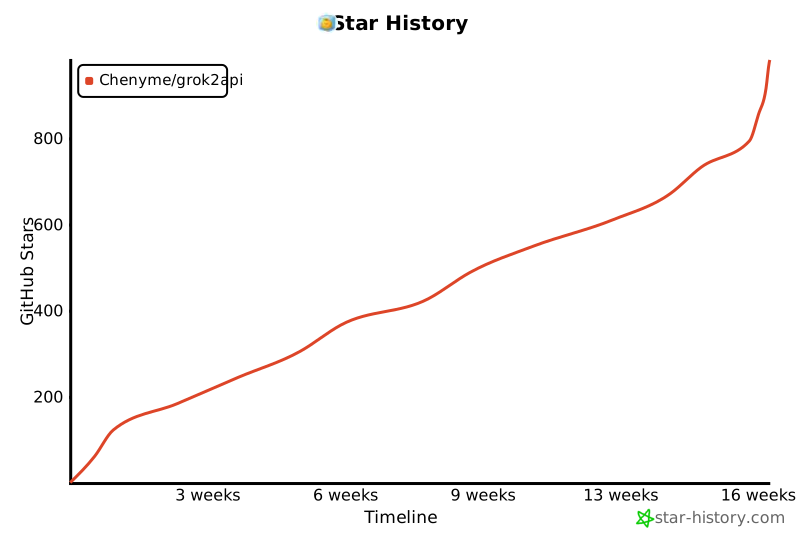
## Star History
[](https://star-history.com/#Chenyme/grok2api&Timeline)