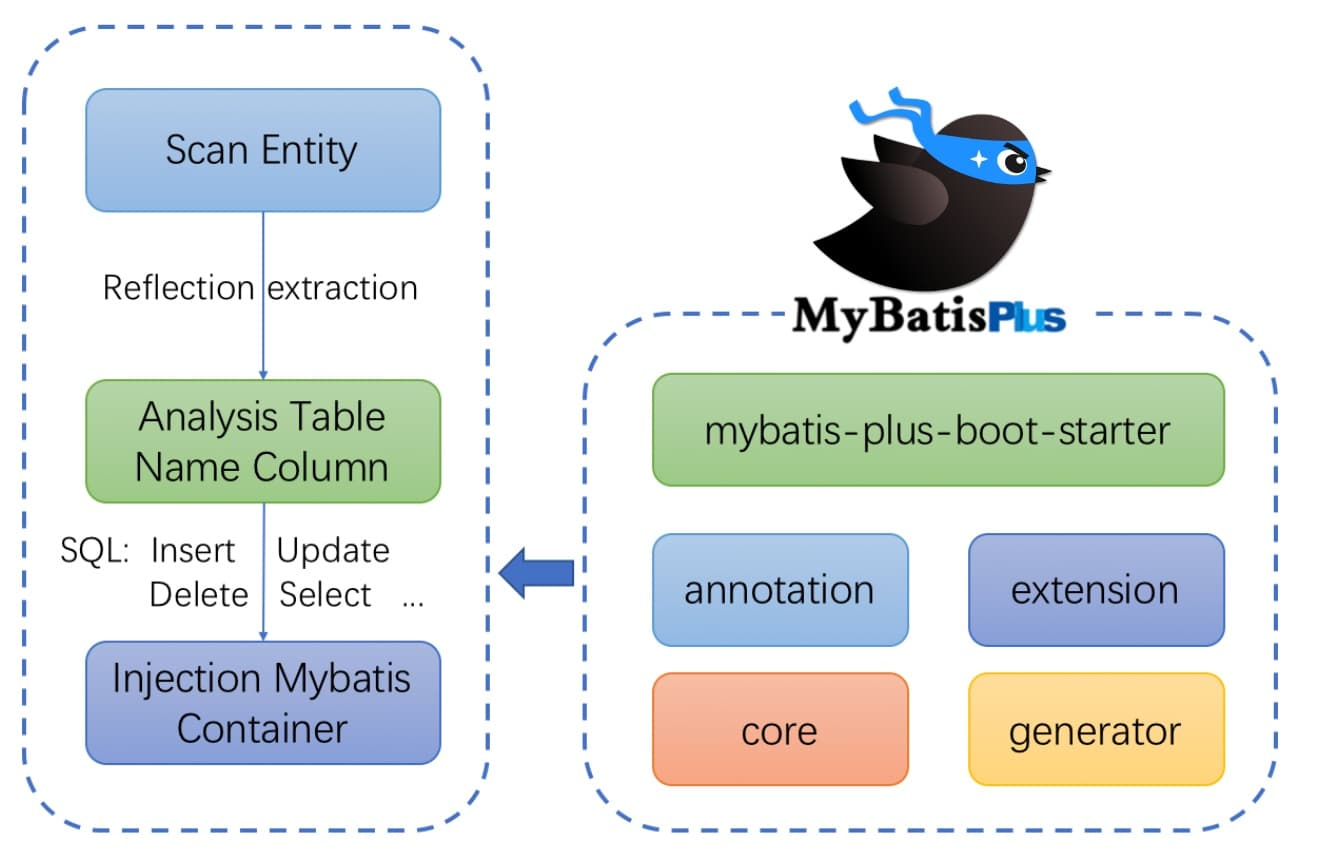
# MyBatis-Plus-SpringBoot **Repository Path**: yzfhly/my-batis-plus-spring-boot ## Basic Information - **Project Name**: MyBatis-Plus-SpringBoot - **Description**: No description available - **Primary Language**: Java - **License**: Not specified - **Default Branch**: master - **Homepage**: None - **GVP Project**: No ## Statistics - **Stars**: 0 - **Forks**: 0 - **Created**: 2022-03-02 - **Last Updated**: 2022-06-15 ## Categories & Tags **Categories**: Uncategorized **Tags**: mybatis-plus ## README # 一、**Mybatis-Plus简介** ## **1、简介** **MyBatis-Plus (opens new window)(简称 MP)是一个 MyBatis (opens new window)的增强工具,在 MyBatis 的基础上只做增强不做改变,为简化开发、提高效率而生。** ![Mybatis-plus](https://s2.loli.net/2022/03/05/FY6Iwm9xy2ecKRo.png) ## **2、特性** - **无侵入**:只做增强不做改变,引入它不会对现有工程产生影响,如丝般顺滑 - **损耗小**:启动即会自动注入基本 CURD,性能基本无损耗,直接面向对象操作 - **强大的 CRUD 操作**:内置通用 Mapper、通用 Service,仅仅通过少量配置即可实现单表大部分 CRUD 操作,更有强大的条件构造器,满足各类使用需求 - **支持 Lambda 形式调用**:通过 Lambda 表达式,方便的编写各类查询条件,无需再担心字段写错 - **支持主键自动生成**:支持多达 4 种主键策略(内含分布式唯一 ID 生成器 - Sequence),可自由配置,完美解决主键问题 - **支持 ActiveRecord 模式**:支持 ActiveRecord 形式调用,实体类只需继承 Model 类即可进行强大的 CRUD 操作 - **支持自定义全局通用操作**:支持全局通用方法注入( Write once, use anywhere ) - **内置代码生成器**:采用代码或者 Maven 插件可快速生成 Mapper 、 Model 、 Service 、 Controller 层代码,支持模板引擎,更有超多自定义配置等您来使用 - **内置分页插件**:基于 MyBatis 物理分页,开发者无需关心具体操作,配置好插件之后,写分页等同于普通 List 查询 - **分页插件支持多种数据库**:支持** **MySQL 、MariaDB、 Oracle 、DB2、H2、HSQL、SQLite、Postgre、SQLServer 等多种数据库 - **内置性能分析插件**:可输出 SQL 语句以及其执行时间,建议开发测试时启用该功能,能快速揪出慢查询 - **内置全局拦截插件**:提供全表 delete 、 update 操作智能分析阻断,也可自定义拦截规则,预防误操作 ## **3、支持数据库** >**任何能使用** **MyBatis** **进行 CRUD, 并且支持标准 SQL 的数据库,具体支持情况如下,如果不在下列表查看分页部分教程 PR 您的支持。** - **MySQL**,**Oracle**,DB2,H2,HSQL,SQLite,PostgreSQL,SQLServer,Phoenix,Gauss ,ClickHouse,Sybase,OceanBase,Firebird,Cubrid,Goldilocks,csiidb - **达梦数据库,虚谷数据库,人大金仓数据库,南大通用(华库)数据库,南大通用数据库,神通数据库,瀚高数据库** ## **4、框架结构** ![框架结构](https://s2.loli.net/2022/03/05/MbV9U2tpFmBS71r.png) ## 5、Maven依赖 **SpringBoot** ~~~xml com.baomidou mybatis-plus-boot-starter 3.5.1 ~~~ **spring** ~~~xml com.baomidou mybatis-plus 3.5.1 ~~~ >注意: > >引入MyBatis-Plus之后请不要再次引入MyBatis以及MyBatis-Spring,以避免因版本差异导致的问题。 ## 6、配置 **SpringBoot** - **配置MapperScan注解** ~~~java @SpringBootApplication @MapperScan("com.baomidou.mybatisplus.samples.quickstart.mapper") public class Application { public static void main(String[] args) { SpringApplication.run(Application.class, args); } } ~~~ **Spring** - **配置MapperScan** ~~~xml ~~~ - **配置SqlSessionFactory 为 MyBatis-Plus 的 SqlSessionFactory** ~~~xml ~~~ # 二、CRUD接口 ## 1、Service CRUD 接口 >说明: > >通用 Service CRUD 封装IService (opens new window)接口,进一步封装 CRUD 采用 get 查询单行 remove 删除 list 查询集合 page 分页 前缀命名方式区分 Mapper 层避免混淆, > >泛型 T 为任意实体对象 > >建议如果存在自定义通用 Service 方法的可能,请创建自己的 IBaseService 继承 Mybatis-Plus 提供的基类 > >对象 Wrapper 为 条件构造器 ### Save ~~~java // 插入一条记录(选择字段,策略插入) boolean save(T entity); // 插入(批量) boolean saveBatch(Collection entityList); // 插入(批量) boolean saveBatch(Collection entityList, int batchSize); ~~~ #### 参数说明 | 类型 | 参数名 | 描述 | | ---------- | ---------- | ------------ | | T | entity | 实体对象 | | Collection | entityList | 实体对象集合 | | int | batchSize | 插入批次数量 | ### SaveOrUpdate ~~~java // TableId 注解存在更新记录,否插入一条记录 boolean saveOrUpdate(T entity); // 根据updateWrapper尝试更新,否继续执行saveOrUpdate(T)方法 boolean saveOrUpdate(T entity, Wrapper updateWrapper); // 批量修改插入 boolean saveOrUpdateBatch(Collection entityList); // 批量修改插入 boolean saveOrUpdateBatch(Collection entityList, int batchSize); ~~~ #### 参数说明 | 类型 | 参数名 | 描述 | | ---------- | ------------- | -------------------------------- | | T | entity | 实体对象 | | Wrapper | updateWrapper | 实体对象封装操作类 UpdateWrapper | | Collection | entityList | 实体对象集合 | | int | batchSize | 插入批次数量 | ### Remove ~~~java // 根据 entity 条件,删除记录 boolean remove(Wrapper queryWrapper); // 根据 ID 删除 boolean removeById(Serializable id); // 根据 columnMap 条件,删除记录 boolean removeByMap(Map columnMap); // 删除(根据ID 批量删除) boolean removeByIds(Collection idList) ~~~ #### 参数说明 | 类型 | 参数名 | 描述 | | ------------ | ------------ | ----------------------- | | Wrapper | queryWrapper | 实体包装类 QueryWrapper | | Serializable | id | 主键 ID | | Map | columnMap | 表字段 map 对象 | | Collection | idList | 主键 ID 列表 | ### Update ```java // 根据 UpdateWrapper 条件,更新记录 需要设置sqlset boolean update(Wrapper updateWrapper); // 根据 whereWrapper 条件,更新记录 boolean update(T updateEntity, Wrapper whereWrapper); // 根据 ID 选择修改 boolean updateById(T entity); // 根据ID 批量更新 boolean updateBatchById(Collection entityList); // 根据ID 批量更新 boolean updateBatchById(Collection entityList, int batchSize); ``` #### 参数说明 | 类型 | 参数名 | 描述 | | ---------- | ------------- | -------------------------------- | | Wrapper | updateWrapper | 实体对象封装操作类 UpdateWrapper | | T | entity | 实体对象 | | Collection | entityList | 实体对象集合 | | int | batchSize | 更新批次数量 | ### Get ```java // 根据 ID 查询 T getById(Serializable id); // 根据 Wrapper,查询一条记录。结果集,如果是多个会抛出异常,随机取一条加上限制条件 wrapper.last("LIMIT 1") T getOne(Wrapper queryWrapper); // 根据 Wrapper,查询一条记录 T getOne(Wrapper queryWrapper, boolean throwEx); // 根据 Wrapper,查询一条记录 Map getMap(Wrapper queryWrapper); // 根据 Wrapper,查询一条记录 V getObj(Wrapper queryWrapper, Function mapper); ``` #### 参数说明 | 类型 | 参数名 | 描述 | | ------------ | ------------ | ------------------------------- | | Serializable | id | 主键 ID | | Wrapper | queryWrapper | 实体对象封装操作类 QueryWrapper | | boolean | throwEx | 有多个 result 是否抛出异常 | | T | entity | 实体对象 | | Function | mapper | 转换函数 | ### List ```java // 查询所有 List list(); // 查询列表 List list(Wrapper queryWrapper); // 查询(根据ID 批量查询) Collection listByIds(Collection idList); // 查询(根据 columnMap 条件) Collection listByMap(Map columnMap); // 查询所有列表 List> listMaps(); // 查询列表 List> listMaps(Wrapper queryWrapper); // 查询全部记录 List listObjs(); // 查询全部记录 List listObjs(Function mapper); // 根据 Wrapper 条件,查询全部记录 List listObjs(Wrapper queryWrapper); // 根据 Wrapper 条件,查询全部记录 List listObjs(Wrapper queryWrapper, Function mapper); ``` #### 参数说明 | 类型 | 参数名 | 描述 | | ---------- | ------------ | ------------------------------- | | Wrapper | queryWrapper | 实体对象封装操作类 QueryWrapper | | Collection | idList | 主键 ID 列表 | | Map | columnMap | 表字段 map 对象 | | Function | mapper | 转换函数 | ### Page ```java // 无条件分页查询 IPage page(IPage page); // 条件分页查询 IPage page(IPage page, Wrapper queryWrapper); // 无条件分页查询 IPage> pageMaps(IPage page); // 条件分页查询 IPage> pageMaps(IPage page, Wrapper queryWrapper); ``` #### **参数说明** | 类型 | 参数名 | 描述 | | ------- | ------------ | ------------------------------- | | IPage | page | 翻页对象 | | Wrapper | queryWrapper | 实体对象封装操作类 QueryWrapper | ### Count ```java // 查询总记录数 int count(); // 根据 Wrapper 条件,查询总记录数 int count(Wrapper queryWrapper); ``` #### **参数说明** | 类型 | 参数名 | 描述 | | ------- | ------------ | ------------------------------- | | Wrapper | queryWrapper | 实体对象封装操作类 QueryWrapper | ### Chain #### query ```java // 链式查询 普通 QueryChainWrapper query(); // 链式查询 lambda 式。注意:不支持 Kotlin LambdaQueryChainWrapper lambdaQuery(); // 示例: query().eq("column", value).one(); lambdaQuery().eq(Entity::getId, value).list ``` #### update ```java // 链式更改 普通 UpdateChainWrapper update(); // 链式更改 lambda 式。注意:不支持 Kotlin LambdaUpdateChainWrapper lambdaUpdate(); // 示例: update().eq("column", value).remove(); lambdaUpdate().eq(Entity::getId, value).update(entity); ``` ## 2、Mapper CRUD 接口 > **说明:** > > - **通用 CRUD 封装**BaseMapper (opens new window)**接口,为** **Mybatis-Plus** **启动时自动解析实体表关系映射转换为** **Mybatis** **内部对象注入容器** > - **泛型** **T** **为任意实体对象** > - **参数** **Serializable** **为任意类型主键** **Mybatis-Plus** **不推荐使用复合主键约定每一张表都有自己的唯一** **id** **主键** > - **对象** **Wrapper** **为** **条件构造器** ### Insert ```java // 插入一条记录 int insert(T entity); ``` #### **参数说明** | 类型 | 参数名 | 描述 | | ---- | ------ | -------- | | T | entity | 实体对象 | ### Delete ```java // 根据 entity 条件,删除记录 int delete(@Param(Constants.WRAPPER) Wrapper wrapper); // 删除(根据ID 批量删除) int deleteBatchIds(@Param(Constants.COLLECTION) Collection idList); // 根据 ID 删除 int deleteById(Serializable id); // 根据 columnMap 条件,删除记录 int deleteByMap(@Param(Constants.COLUMN_MAP) Map columnMap) ``` #### **参数说明** | 类型 | 参数名 | 描述 | | ------------ | --------- | ------------------------------------ | | Wrapper | wrapper | 实体对象封装操作类(可以为 null) | | Collection | idList | 主键 ID 列表(不能为 null 以及 empty) | | Serializable | id | 主键 ID | | Map | columnMap | 表字段 map 对象 | ### Update ```java // 根据 whereWrapper 条件,更新记录 int update(@Param(Constants.ENTITY) T updateEntity, @Param(Constants.WRAPPER) Wrapper whereWrapper); // 根据 ID 修改 int updateById(@Param(Constants.ENTITY) T entity); ``` #### **参数说明** | 类型 | 参数名 | 描述 | | ------- | ------------- | ------------------------------------------------------------ | | T | entity | 实体对象 (set 条件值,可为 null) | | Wrapper | updateWrapper | 实体对象封装操作类(可以为 null,里面的 entity 用于生成 where 语句) | ### Select ```java // 根据 ID 查询 T selectById(Serializable id); // 根据 entity 条件,查询一条记录 T selectOne(@Param(Constants.WRAPPER) Wrapper queryWrapper); // 查询(根据ID 批量查询) List selectBatchIds(@Param(Constants.COLLECTION) Collection idList); // 根据 entity 条件,查询全部记录 List selectList(@Param(Constants.WRAPPER) Wrapper queryWrapper); // 查询(根据 columnMap 条件) List selectByMap(@Param(Constants.COLUMN_MAP) Map columnMap); // 根据 Wrapper 条件,查询全部记录 List> selectMaps(@Param(Constants.WRAPPER) Wrapper queryWrapper); // 根据 Wrapper 条件,查询全部记录。注意: 只返回第一个字段的值 List selectObjs(@Param(Constants.WRAPPER) Wrapper queryWrapper); // 根据 entity 条件,查询全部记录(并翻页) IPage selectPage(IPage page, @Param(Constants.WRAPPER) Wrapper queryWrapper); // 根据 Wrapper 条件,查询全部记录(并翻页) IPage> selectMapsPage(IPage page, @Param(Constants.WRAPPER) Wrapper queryWrapper); // 根据 Wrapper 条件,查询总记录数 Integer selectCount(@Param(Constants.WRAPPER) Wrapper queryWrapper); ``` #### **参数说明** | 类型 | 参数名 | 描述 | | ------------ | ------------ | ---------------------------------------- | | Serializable | id | 主键 ID | | Wrapper | queryWrapper | 实体对象封装操作类(可以为 null) | | Collection | idList | 主键 ID 列表(不能为 null 以及 empty) | | Map | columnMap | 表字段 map 对象 | | IPage | page | 分页查询条件(可以为 RowBounds.DEFAULT) | # 三、常用注解 ## **1、@TableName** - **描述:表名注解,标识实体类对应的表** - **使用位置:实体类** | **属性** | **类型** | **必须指定** | **默认值** | **描述** | | -------------------- | ------------ | ------------ | ---------- | ------------------------------------------------------------ | | **value** | **String** | **否** | **""** | **表名** | | **schema** | **String** | **否** | **""** | **schema** | | **keepGlobalPrefix** | **boolean** | **否** | **false** | **是否保持使用全局的 tablePrefix 的值(当全局 tablePrefix 生效时)** | | **resultMap** | **String** | **否** | **""** | **xml 中 resultMap 的 id(用于满足特定类型的实体类对象绑定)** | | **autoResultMap** | **boolean** | **否** | **false** | **是否自动构建 resultMap 并使用(如果设置 resultMap 则不会进行 resultMap 的自动构建与注入)** | | **excludeProperty** | **String[]** | **否** | **{}** | **需要排除的属性名 @since 3.3.1** | > **关于** **autoResultMap** **的说明:** > > MP 会自动构建一个 resultMap 并注入到 MyBatis 里(一般用不上),请注意以下内容: > > 因为 MP 底层是 MyBatis,所以 MP 只是帮您注入了常用 CRUD 到 MyBatis 里,注入之前是动态的(根据您的 Entity 字段以及注解变化而变化),但是注入之后是静态的(等于 XML 配置中的内容)。 > > 而对于 typeHandler 属性,MyBatis 只支持写在 2 个地方: > > 1.定义在 resultMap 里,作用于查询结果的封装 > > 2.定义在 insert 和 update 语句的 #{property} 中的 property 后面(例:#{property,typehandler=xxx.xxx.xxx}),并且只作用于当前设置值 > > 除了以上两种直接指定 typeHandler 的形式,MyBatis 有一个全局扫描自定义 typeHandler 包的配置,原理是根据您的 property 类型去找其对应的 typeHandler 并使用。 ### 使用方法: - 在实体类中使用 ```java @TableName("sys_user") public class User { private Long id; private String name; private Integer age; private String email; } ``` - 配置.yml文件 ```yml #设置mybatis-plus的全局配置 global-config: db-config: #设置实体类对应数据表的统一前缀 table-prefix: tb_ ``` ## **2、@TableId** - **描述:主键注解** - **使用位置:实体类主键字段** | **属性** | **类型** | 必须指定 | 默认值 | 描述 | | --------- | ---------- | -------- | ----------- | ------------ | | **value** | **String** | 否 | "" | 主键字段名 | | **type** | **Enum** | 否 | IdType.NONE | 指定主键类型 | #### 例如: - ##### 在实体类中使用 ```java @TableName("sys_user") public class User { @TableId private Long id; private String name; private Integer age; private String email; } ``` - ##### 在.yml文件中配置 ~~~yml #设置主键统一生成策略 id-type: auto ~~~ - ##### IdType属性 | **值** | **描述** | | ----------------- | ------------------------------------------------------------ | | **AUTO** | **数据库 ID 自增** | | **NONE** | **无状态,该类型为未设置主键类型(注解里等于跟随全局,全局里约等于 INPUT)** | | **INPUT** | **insert 前自行 set 主键值** | | **ASSIGN_ID** | **分配 ID(主键类型为 Number(Long 和 Integer)或 String)(since 3.3.0),使用接口 IdentifierGenerator 的方法 nextId (默认实现类为 DefaultIdentifierGenerator 雪花算法)** | | **ASSIGN_UUID** | **分配 UUID,主键类型为 String(since 3.3.0),使用接口 IdentifierGenerator 的方法 nextUUID (默认 default 方法)** | | **ID_WORKER** | **分布式全局唯一 ID 长整型类型(please use ASSIGN_ID )** | | **UUID** | **32 位 UUID 字符串(please use ASSIGN_UUID )** | | **ID_WORKER_STR** | **分布式全局唯一 ID 字符串类型(please use ASSIGN_ID )** | ## **3、@TableField** - **描述:字段注解(非主键)** | **属性** | **类型** | **必须指定** | **默认值** | **描述** | | -------------------- | ------------ | ------------ | ---------------------------- | ------------------------------------------------------------ | | **value** | **String** | **否** | **""** | **数据库字段名** | | **exist** | **boolean** | **否** | **true** | **是否为数据库表字段** | | **condition** | **String** | **否** | **""** | **字段 where 实体查询比较条件,有值设置则按设置的值为准,没有则为默认全局的 %s=#{%s}** | | **update** | **String** | **否** | **""** | **字段 update set 部分注入,例如:当在version字段上注解 update="%s+1" 表示更新时会 set version=version+1 (该属性优先级高于 el 属性)** | | **insertStrategy** | **Enum** | **否** | **FieldStrategy.DEFAULT** | **举例:NOT_NULL insert into table_a(column) values (#{columnProperty})** | | **updateStrategy** | **Enum** | **否** | **FieldStrategy.DEFAULT** | **举例:IGNORED update table_a set column=#{columnProperty}** | | **whereStrategy** | **Enum** | **否** | **FieldStrategy.DEFAULT** | **举例:NOT_EMPTY where column=#{columnProperty}** | | **fill** | **Enum** | **否** | **FieldFill.DEFAULT** | **字段自动填充策略** | | **select** | **boolean** | **否** | **true** | **是否进行 select 查询** | | **keepGlobalFormat** | **boolean** | **否** | **false** | **是否保持使用全局的 format 进行处理** | | **jdbcType** | **JdbcType** | **否** | **JdbcType.UNDEFINED** | **JDBC 类型 (该默认值不代表会按照该值生效)** | | **typeHandler** | **Class** | **否** | **UnknownTypeHandler.class** | **类型处理器 (该默认值不代表会按照该值生效)** | | **numericScale** | **String** | **否** | **""** | **指定小数点后保留的位数** | > 关于`jdbcType`和`typeHandler`以及`numericScale`的说明: > > numericScale只生效于 update 的 sql. jdbcType和typeHandler如果不配合@TableName#autoResultMap = true一起使用,也只生效于 update 的 sql. 对于typeHandler如果你的字段类型和 set 进去的类型为equals关系,则只需要让你的typeHandler让 Mybatis 加载到即可,不需要使用注解 ```java @TableName("sys_user") public class User { @TableId private Long id; @TableField("nickname") private String name; private Integer age; private String email; } ``` - **FieldStrategy属性** | 值 | 描述 | | --------- | ----------------------------------------------------------- | | IGNORED | 忽略判断 | | NOT_NULL | 非 NULL 判断 | | NOT_EMPTY | 非空判断(只对字符串类型字段,其他类型字段依然为非 NULL 判断) | | DEFAULT | 追随全局配置 | - **FieldFill** | **值** | **描述** | | ----------------- | ------------------------ | | **DEFAULT** | **默认不处理** | | **INSERT** | **插入时填充字段** | | **UPDATE** | **更新时填充字段** | | **INSERT_UPDATE** | **插入和更新时填充字段** | ## **4、@Version** - **描述:乐观锁注解、标记** **@Version** **在字段上** ## **5、@EnumValue** - **描述:普通枚举类注解(注解在字段上)** ## **6、@TableLogic** - **描述: 表字段逻辑处理注解(逻辑删除)** ## **常见问题:** ### 1、如何 insert? ```properties 1、字段在数据库定义默认值(推荐) 2、insert 前自己 set 值 3、使用自动填充功能 ``` ### 2、删除接口自动填充功能失效 ```properties 使用 update 方法并:UpdateWrapper.set(column, value)(推荐) 使用 update 方法并: UpdateWrapper.setSql("column=value")* 使用Sql注入器注入com.baomidou.mybatisplus.extension.injector.methods.LogicDeleteByIdWithFill并使用(推荐) ``` ## **使用方法:** **1: 配置** **com.baomidou.mybatisplus.core.config.GlobalConfig$DbConfig** **例 application.yml** ```yml mybatis-plus: global-config: db-config: logic-delete-field: flag # 全局逻辑删除的实体字段名(since 3.3.0,配置后可以忽略不配置步骤2) logic-delete-value: 1 # 逻辑已删除值(默认为 1) logic-not-delete-value: 0 # 逻辑未删除值(默认为 0) ``` **2:在实体类字段上添加@TableLogic注解** ```java @TableLogic private Integer deleted; ``` > 说明: > > **只对自动注入的 sql 起效:** > > **·插入: 不作限制** > > **·查找: 追加 where 条件过滤掉已删除数据,且使用 wrapper.entity 生成的 where 条件会忽略该字段** > > **·更新: 追加 where 条件防止更新到已删除数据,且使用 wrapper.entity 生成的 where 条件会忽略该字段** > > **·删除: 转变为 更新** > > **例如:** > > **·删除:** **update user set deleted=1 where id = 1 and deleted=0** > > **·查找:** **select id,name,deleted from user where deleted=0** > > **字段类型支持说明:** > > **·支持所有数据类型(推荐使用** **Integer , Boolean , LocalDateTime )** > > **·如果数据库字段使用 datetime ,逻辑未删除值和已删除值支持配置为字符串 null ,另一个值支持配置为函数来获取值如 now()** > > **附录:** > > **·逻辑删除是为了方便数据恢复和保护数据本身价值等等的一种方案,但实际就是删除。** > > **·如果你需要频繁查出来看就不应使用逻辑删除,而是以一个状态去表示。** ## **7、@SqlParser** **Deprecated** 见 **@InterceptorIgnore** ## **8、@KyeSequence** - **描述:序列主键策略** **oracle** - **属性:value、resultMap** | **属性** | **类型** | **必须指定** | **默认值** | **描述** | | --------- | ---------- | ------------ | -------------- | ------------------------------------------------------------ | | **value** | **String** | **否** | **""** | **序列名** | | **clazz** | **Class** | **否** | **Long.class** | **id 的类型, 可以指定 String.class,这样返回的 Sequence 值是字符串"1"** | ## **9、@InterceptorIgnore** 见 插件章节 ## **10、@OrdrBy** - **描述: 内置 SQL 默认指定排序,优先级低于 wrapper 条件查询** | **属性** | **类型** | **必须指定** | **默认值** | **描述** | | ---------- | ----------- | ------------ | ------------------- | ------------------ | | **isDesc** | **boolean** | **否** | **true** | **是否倒序查询** | | **sort** | **short** | **否** | **Short.MAX_VALUE** | **数字越小越靠前** | # 四、条件构造器 > □ Wrapper : 条件构造抽象类,最顶端父类 > > • AbstractWrapper : 用于查询条件封装,生成 sql 的 where 条件 > > ​ •QueryWrapper : Entity 对象封装操作类,不是用lambda语法 > > ​ •UpdateWrapper : Update 条件封装,用于Entity对象更新操作 > > ​ •AbstractLambdaWrapper : Lambda 语法使用 Wrapper统一处理解析 lambda 获取 column。 > > ​ •LambdaQueryWrapper :看名称也能明白就是用于Lambda语法使用的查询Wrapper > > ​ •LambdaUpdateWrapper : Lambda 更新封装Wrapper **方法:** | **方法名** | **描述** | | --------------- | ------------------------------------------------------------ | | **eq** | **等于=**例:**eq("name", "老王")**--->name = '老王' | | **ne** | **不等于<>**例:**ne("name", "老王")**--->name <> '老王' | | **gt** | **大于>**例: **gt("age", 18) --->age > 18 | | **ge** | **大于等于≥ 例:** **ge("age", 18) --->**age ≥ 18** | | **lt** | **小于< 例:** **lt("age", 18) ---> age < 18** | | **le** | **小于等于≤ 例:** **lt("age", 18) ---> age ≤ 18** | | **between** | **between 值1 and 值2 例:** **between("age", 18, 30) ---> age between 18 and 30** | | **notBetween** | **not between 值1 and 值2 例:** **notBetween("age", 18, 30) ---> age not between 18 and 30** | | **like** | **LIKE '%值%' 例:** **like("name", "王") ---> name like '%王%'** | | **notLike** | **NOT LIKE '%值%' 例:** **notLike("name", "王") ---> name not like '%王%'** | | **likeLeft** | **LIKE '%值' 例:** **likeLeft("name", "王") ---> name like '%王'** | | **likeRight** | **LIKE '值%' 例:** **likeRight("name", "王") ---> name like '王%'** | | **isNull** | **字段 IS NULL 例:** **isNull("name") ---> name is null** | | **isBotNull** | **字段 IS NOT NULL 例:** **isNotNull("name") ---> name is not null** | | **in** | **字段 IN (value.get(0), value.get(1), ...) 例:** **in("age",{1,2,3}) ---> age in (1,2,3) 字段 IN (v0, v1, ...) 例:** **in("age", 1, 2, 3) ---> age in (1,2,3)** | | **notIn** | **字段 NOT IN (value.get(0), value.get(1), ...) 例:** **notIn("age",{1,2,3}) ---> age not in (1,2,3) 字段 NOT IN (v0, v1, ...) 例:** **notIn("age", 1, 2, 3) ---> age not in (1,2,3)** | | **inSql** | **字段 IN ( sql语句 ) 例:** **inSql("age", "1,2,3,4,5,6") ---> age in (1,2,3,4,5,6) 例:** **inSql("id", "select id from table where id < 3") ---> id in (select id from table where id < 3)** | | **notInSql** | **字段 NOT IN ( sql语句 ) 例:** **notInSql("age", "1,2,3,4,5,6") ---> age not in (1,2,3,4,5,6) 例:** **notInSql("id", "select id from table where id < 3") ---> id not in (select id from table where id < 3)** | | **groupBy** | **分组:GROUP BY 字段, ... 例:** **groupBy("id", "name") ---> group by id,name** | | **orderByAsc** | **排序:ORDER BY 字段, ... ASC 例:** **orderByAsc("id", "name") ---> order by id ASC,name ASC** | | **orderByDesc** | **排序:ORDER BY 字段, ... DESC 例:** **orderByDesc("id", "name") ---> order by id DESC,name DESC** | | **orderBy** | **排序:ORDER BY 字段, ... 例:** **orderBy(true, true, "id", "name") ---> order by id ASC,name ASC** | | **having** | **HAVING ( sql语句 ) 例:** **having("sum(age) > 10") ---> having sum(age) > 10 例:** **having("sum(age) > {0}", 11) ---> having sum(age) > 11** | | **func** | **func 方法(主要方便在出现if...else下调用不同方法能不断链) 例:** **func(i -> if(true) {i.eq("id", 1)} else {i.ne("id", 1)})** | | **or** | **拼接 OR 注意事项:主动调用 or 表示紧接着下一个方法不是用 and 连接!(不调用 or 则默认为使用 and 连接) 例:** **eq("id",1).or().eq("name","老王") ---> id = 1 or name = '老王'** | | **or** | **OR 嵌套** 例: **or(i -> i.eq("name", "李白").ne("status", "活着")) ---> or (name = '李白' and status <> '活着')** | | **and** | **AND 嵌套 例:** **and(i -> i.eq("name", "李白").ne("status", "活着")) ---> and (name = '李白' and status <> '活着')** | | **nested** | **正常嵌套 不带 AND 或者 OR 例:** **nested(i -> i.eq("name", "李白").ne("status", "活着")) ---> (name = '李白' and status <> '活着')** | | **apply** | **拼接 sq l 注意事项: 该方法可用于数据库函数 动态入参的 params 对应前面 applySql 内部的 {index} 部分.这样是不会有sql注入风险的,反之会有! 例:** **apply("id = 1") ---> id = 1 例:** **apply("date_format(dateColumn,'%Y-%m-%d') = '2008-08-08'") ---> date_format(dateColumn,'%Y-%m-%d') = '2008-08-08'") 例:** **apply("date_format(dateColumn,'%Y-%m-%d') = {0}", "2008-08-08") ---> date_format(dateColumn,'%Y-%m-%d') = '2008-08-08'")** | | **last** | **无视优化规则直接拼接到 sql 的最后 注意事项:只能调用一次,多次调用以最后一次为准 有sql注入的风险,请谨慎使用 例:** **last("limit 1")** | | **exists** | **拼接 EXISTS ( sql语句 ) 例:** **exists("select id from table where age = 1") ---> exists (select id from table where age = 1)** | | **notExists** | **拼接 NOT EXISTS ( sql语句 ) 例:** **notExists("select id from table where age = 1") ---> not exists (select id from table where age = 1)** | | **select** | **设置查询字段 ·说明:以上方法分为两类.第二类方法为:过滤查询字段(主键除外),入参不包含 class 的调用前需要 wrapper 内的 entity 属性有值! 这两类方法重复调用以最后一次为准 例:** **select("id", "name", "age") 例:** **select(i -> i.getProperty().startsWith("test"))** | | **set** | **SQL SET 字段 例:** **set("name", "老李头") 例:** **set("name", "") --->数据库字段值变为 空字符串 例:** **set("name", null) --->数据库字段值变为 null** | | **setSql** | **设置 SET 部分 SQL 例:** **setSql("name = '老李头'")** | | **lambda** | **获取** **LambdaWrapper 在 QueryWrapper 中是获取 LambdaQueryWrapper 在 UpdateWrapper 中是获取 LambdaUpdateWrapper** | ## 1、QueryWrapper >说明: > >继承自 AbstractWrapper ,自身的内部属性 entity 也用于生成 where 条件 > >及 LambdaQueryWrapper, 可以通过 new QueryWrapper().lambda() 方法获取 ### 1.1、组装查询条件 ```java @Test public void test01() { //查询用户名含有a且年龄在20和30之间且邮箱信息不为空的用户信息 //SELECT id,user_name,password,name,age,email,is_deleted FROM tb_user WHERE is_deleted=0 AND (user_name LIKE ? AND age BETWEEN ? AND ? AND email IS NOT NULL) QueryWrapper wrapper = new QueryWrapper<>(); wrapper.like("user_name", "a") .between("age", 20, 30) .isNotNull("email"); userMapper.selectList(wrapper).forEach(System.out ::println); } ``` ### 1.2、组装排序条件 ```java @Test public void test02() { //查询用户信息,按照年龄的降序排序,若年龄相同,则按照id的升序排序 //SELECT id,user_name,password,name,age,email,is_deleted FROM tb_user WHERE is_deleted=0 ORDER BY age DESC,id ASC QueryWrapper wrapper = new QueryWrapper<>(); wrapper.orderByDesc("age") .orderByAsc("id"); userMapper.selectList(wrapper).forEach(System.out ::println); } ``` ### 1.3、组装删除条件 ```java @Test public void test03() { //删除邮箱地址为空的用户信息 //UPDATE tb_user SET is_deleted=1 WHERE is_deleted=0 AND (email IS NULL) QueryWrapper wrapper = new QueryWrapper<>(); wrapper.isNull("email"); int delete = userMapper.delete(wrapper); System.out.println(delete); } ``` ### 1.4、组装修改条件 ```java @Test public void test04() { //将(年龄大于20并且用户名中包含有a)或邮箱为null的用户信息修改 // Preparing: UPDATE tb_user SET user_name=?, password=?, name=?, age=?, email=? WHERE is_deleted=0 AND (age > ? AND user_name LIKE ? OR email IS NULL) QueryWrapper wrapper = new QueryWrapper<>(); wrapper.gt("age", 20) .like("user_name", "a") .or() .isNull("email"); User user = new User(); user.setName("小明"); user.setEmail("test@ly.com"); int i = userMapper.update(user, wrapper); System.out.println(i); } ``` ### 1.5、条件的优先级 ```java @Test public void test05() { //将用户名中含有a(年龄大于20或邮箱为null)的用户信息修改 //lambda中的条件优先执行 //UPDATE tb_user SET user_name=?, password=?, name=?, age=?, email=? WHERE is_deleted=0 AND (user_name LIKE ? AND (age > ? OR email IS NULL)) QueryWrapper wrapper = new QueryWrapper<>(); wrapper.like("user_name","a") .and(i->i.gt("age",20).or().isNull("email")); User user = new User(); user.setName("Tom"); user.setEmail("Tom@ly.com"); int i = userMapper.update(user, wrapper); System.out.println(i); } ``` ### 1.6、组装select子句 ```java @Test public void test06() { //查询用户的用户名,年龄,邮箱信息 //SELECT user_name,age,email FROM tb_user WHERE is_deleted=0 QueryWrapper wrapper = new QueryWrapper<>(); wrapper.select("user_name","age","email"); userMapper.selectMaps(wrapper).forEach(System.out::println); } ``` ### 1.7、实现子查询 ```java @Test public void test07() { //查询id 小于等于10的用户信息 //SELECT id,user_name,password,name,age,email,is_deleted FROM tb_user WHERE is_deleted=0 AND (id IN (select id from tb_user where id <= 10)) QueryWrapper wrapper = new QueryWrapper<>(); wrapper.inSql("id","select id from tb_user where id <= 10"); userMapper.selectList(wrapper).forEach(System.out::println); } ``` ## 2、UpdateWrapper >说明: > >继承自 AbstractWrapper ,自身的内部属性 entity 也用于生成 where 条件 > >及 LambdaUpdateWrapper, 可以通过 new UpdateWrapper().lambda() 方法获取! ```java @Test public void test08() { //将用户名中含有a(年龄大于20或邮箱为null)的用户信息修改 //UPDATE tb_user SET name=?,email=? WHERE is_deleted=0 AND (user_name LIKE ? AND (age > ? OR email IS NULL)) UpdateWrapper wrapper = new UpdateWrapper<>(); wrapper.like("user_name","a") .and(i->i.gt("age",20).or().isNull("email")); wrapper.set("name","小黑").set("email","abc@ly.com"); int i = userMapper.update(null, wrapper); System.out.println(i); } ``` ## 3、模拟开发中组装的情况 #### 3.1、UpdateWrapper ```java @Test public void test09() { //SELECT id,user_name,password,name,age,email,is_deleted FROM tb_user WHERE is_deleted=0 AND (user_name LIKE ? AND age <= ?) String username = "a"; Integer ageBegin = null; Integer ageEnd = 30; QueryWrapper wrapper = new QueryWrapper<>(); if (StringUtils.isNotBlank(username)) { //isNotBlank判断某个字符串是否不为空字符串,不为null,不为空白符 wrapper.like("user_name", username); } if (ageBegin != null){ wrapper.ge("age",ageBegin); } if (ageEnd != null) { wrapper.le("age", ageEnd); } userMapper.selectList(wrapper).forEach(System.out::println); } ``` #### **3.2、使用condition组装条件** >在真正开发的过程中,组装条件是常见的功能,而这些条件数据来源于用户输入,是可选的,因此我们在组装这些条件时,必须先判断用户是否选择了这些条件,若选择则需要组装该条件,若没有选择则一定不能组装,以免影响SQL执行的结果 ```java @Test public void test10() { //SELECT id,user_name,password,name,age,email,is_deleted FROM tb_user WHERE is_deleted=0 AND (user_name LIKE ? AND age <= ?) String username = "a"; Integer ageBegin = null; Integer ageEnd = 30; QueryWrapper wrapper = new QueryWrapper<>(); wrapper.like(StringUtils.isNotBlank(username),"user_name","username") .ge(ageBegin != null,"age","ageBegin") .le(ageEnd != null,"age","ageEnd"); userMapper.selectList(wrapper).forEach(System.out::println); } ``` #### **3.3、**LambdaQueryWrapper ```java @Test public void test11() { //Preparing: SELECT id,user_name,password,name,age,email,is_deleted FROM tb_user WHERE is_deleted=0 AND (user_name LIKE ? AND age <= ?) String username = "a"; Integer ageBegin = null; Integer ageEnd = 30; LambdaQueryWrapper wrapper = new LambdaQueryWrapper<>(); wrapper.like(StringUtils.isNotBlank(username),User::getUserName,username) .ge(ageBegin != null,User::getAge,ageBegin) .le(ageEnd != null,User::getAge,ageEnd); userMapper.selectList(wrapper).forEach(System.out::println); } ``` #### **3.4、**LambdaUpdateWrapper ```java @Test public void test12() { //将用户名中含有a(年龄大于20或邮箱为null)的用户信息修改 //UPDATE tb_user SET name=?,email=? WHERE is_deleted=0 AND (user_name LIKE ? AND (age > ? OR email IS NULL)) LambdaUpdateWrapper wrapper = new LambdaUpdateWrapper<>(); wrapper.like(User::getUserName, "a") .and(i -> i.gt(User::getAge, 20).or().isNull(User::getEmail)); wrapper.set(User::getName, "小黑").set(User::getEmail, "abc@ly.com"); int i = userMapper.update(null, wrapper); System.out.println(i); } ``` # 五、插件 ## **1、分页插件** ### **1)配置** ```java @Configuration @MapperScan("com.ly.mybatisplus.mapper") public class MyBatisPlusConfig { @Bean public MybatisPlusInterceptor mybatisPlusInterceptor() { MybatisPlusInterceptor mybatisPlusInterceptor = new MybatisPlusInterceptor(); mybatisPlusInterceptor.addInnerInterceptor(new PaginationInnerInterceptor(DbType.MYSQL)); return mybatisPlusInterceptor; } } ``` ### **2)测试** #### **1.简单使用** ```java @Test public void testPage() { Page page = new Page<>(1, 3); userMapper.selectPage(page,null); System.out.println(page); } ``` 结果: ![分页插件简单查询结果](https://s2.loli.net/2022/03/05/LwHnBb9aQy75N2A.png) #### 2、获取相关参数 ```java @Test public void testPage() { //SELECT id,user_name,password,name,age,email,is_deleted FROM tb_user WHERE is_deleted=0 LIMIT ? Page page = new Page<>(1, 3); userMapper.selectPage(page,null); System.out.println("当前页的记录:"+page.getRecords()); System.out.println("总页数:"+page.getPages()); System.out.println("数据总条数:"+page.getTotal()); System.out.println("当前页记录的大小:"+page.getSize()); System.out.println("是否有下一页:"+page.hasNext()); System.out.println("是否有上一页:"+page.hasPrevious()); } ``` 结果: ![获取相关参数结果](https://s2.loli.net/2022/03/05/iSWugvX57l4paho.png) ### **3.自定义分页功能** #### **①在UserMapper.java中定义功能** ```java /** * 通过用户年龄查询用户信息并分页 * @param page Mybatis-Plus所提供的分页对象,并且必须在第一个参数的位置 * @param age 用户年龄 * @return 返回page对象 */ Page selectPageVo(@Param("page") Page page,@Param("age") Integer age); ``` #### **②在对应的.xml文件中配置对应的sql语句** **配置别名** ```yml #配置类型别名所对应的包 type-aliases-package: com.ly.mybatisplus.pojo ``` ```java ``` #### **③编写测试方法** ```java @Test public void selectPageVo() { //select id,user_name,password,name,age,email from user where age > ? LIMIT ? Page page = new Page<>(1,3); userMapper.selectPageVo(page, 20); System.out.println("当前页的记录:"+page.getRecords()); System.out.println("总页数:"+page.getPages()); System.out.println("数据总条数:"+page.getTotal()); System.out.println("当前页记录的大小:"+page.getSize()); System.out.println("是否有下一页:"+page.hasNext()); System.out.println("是否有上一页:"+page.hasPrevious()); } ``` 结果: ![自定义分页功能结果](https://s2.loli.net/2022/03/05/jbUHZhuwFQdPfaL.png) ## **2、乐观锁 OptimisticLockerInnerInterceptor** >**当要更新一条记录的时候,希望这条记录没有被别人更新** > >**乐观锁实现方式:** > >**·取出记录时,获取当前 version** > >**·更新时,带上这个 version** > >**·执行更新时, set version = newVersion where version = oldVersion** > >**·如果 version 不对,就更新失败** ### **乐观锁配置需要两步:** #### **1.配置插件** **Spring Boot注解方式** ```java @Bean public MybatisPlusInterceptor mybatisPlusInterceptor() { MybatisPlusInterceptor interceptor = new MybatisPlusInterceptor(); interceptor.addInnerInterceptor(new OptimisticLockerInnerInterceptor()); return interceptor; } ``` #### **2.在实体类的字段上加上**@Version注解 ```java @Version private Integer version; ``` >**说明:** > >**支持的数据类型只有:int,Integer,long,Long,Date,Timestamp,LocalDateTime** > >**整数类型下** **newVersion = oldVersion + 1** > >**newVersion** **会回写到** **entity** **中** > >**仅支持** **updateById(id)** **与** **update(entity, wrapper)** **方法** > >**在** **update(entity, wrapper)** **方法下,** **wrapper** **不能复用!!!** # 六、通用枚举 >**自**3.1.0开始,如果你无需使用原生枚举,可配置默认枚举来省略扫描通用枚举配置 默认枚举配置 > >**升级说明:**3.1.0 **以下版本改变了原生默认行为,升级时请将默认枚举设置为**EnumOrdinalTypeHandler > >**影响用户:**实体中使用原生枚举 > >**其他说明:**配置枚举包扫描的时候能提前注册使用注解枚举的缓存 ## **1、声明通用枚举属性** >**方式一: 使用 @EnumValue 注解枚举属性** ```java public enum GradeEnum { PRIMARY(1, "小学"), SECONDORY(2, "中学"), HIGH(3, "高中"); GradeEnum(int code, String descp) { this.code = code; this.descp = descp; } @EnumValue//标记数据库存的值是code private final int code; //。。。 } ``` >**方式二: 枚举属性,实现 IEnum 接口如下:** ```java public enum AgeEnum implements IEnum { ONE(1, "一岁"), TWO(2, "二岁"), THREE(3, "三岁"); private int value; private String desc; @Override public Integer getValue() { return this.value; } } ``` >**实体属性使用枚举类型** ```java public class User { /** * 名字 * 数据库字段: name varchar(20) */ private String name; /** * 年龄,IEnum接口的枚举处理 * 数据库字段:age INT(3) */ private AgeEnum age; /** * 年级,原生枚举(带{@link com.baomidou.mybatisplus.annotation.EnumValue}): * 数据库字段:grade INT(2) */ private GradeEnum grade; } ``` ## **2、配置扫描通用枚举** >**配置文件 resources/application.yml** ```java mybatis-plus: # 支持统配符 * 或者 ; 分割 typeEnumsPackage: com.baomidou.springboot.entity.enums .... ``` >**自定义配置类 MybatisPlusAutoConfiguration** ```jav @Configuration public class MybatisPlusAutoConfiguration { @Bean public MybatisPlusPropertiesCustomizer mybatisPlusPropertiesCustomizer() { return properties -> { GlobalConfig globalConfig = properties.getGlobalConfig(); globalConfig.setBanner(false); MybatisConfiguration configuration = new MybatisConfiguration(); configuration.setDefaultEnumTypeHandler(MybatisEnumTypeHandler.class); properties.setConfiguration(configuration); }; } } ``` ## 3**、如何序列化枚举值为数据库存储值?** ### **3.1、**Jackson #### **3.1.1、重写 toString 方法** ##### **①**springboot ```java @Bean public Jackson2ObjectMapperBuilderCustomizer customizer(){ return builder -> builder.featuresToEnable(SerializationFeature.WRITE_ENUMS_USING_TO_STRING); } ``` ##### ②Jackson ```java ObjectMapper objectMapper = new ObjectMapper(); objectMapper.configure(SerializationFeature.WRITE_ENUMS_USING_TO_STRING, true); ``` >**以上两种方式任选其一,然后在枚举中复写 toString 方法即可.** #### **3.1.2、注解处理** ```java public enum GradeEnum { PRIMARY(1, "小学"), SECONDORY(2, "中学"), HIGH(3, "高中"); GradeEnum(int code, String descp) { this.code = code; this.descp = descp; } @EnumValue private final int code; } ``` **在.yml文件中配置扫描通用枚举** ```yml #扫描通用枚举的包 type-enums-package: com.ly.mybatisplus.enums ``` ### **3.2、Fastjson** #### **3.2.1、**重写 toString 方法 ##### **①全局处理方式** ```java FastJsonConfig config = new FastJsonConfig(); config.setSerializerFeatures(SerializerFeature.WriteEnumUsingToString); ``` ##### **②局部处理方式** ```java @JSONField(serialzeFeatures= SerializerFeature.WriteEnumUsingToString) private UserStatus status; ``` >**以上两种方式任选其一,然后在枚举中复写 toString 方法即可.** # 七、代码生成器 ## **1、导入依赖** ```xml com.baomidou mybatis-plus-generator 3.5.2 org.freemarker freemarker 2.3.31 ``` ## **2、使用** ### **2.1、快速生成** ```java FastAutoGenerator.create("url", "username", "password") .globalConfig(builder -> { builder.author("baomidou") // 设置作者 .enableSwagger() // 开启 swagger 模式 .fileOverride() // 覆盖已生成文件 .outputDir("D://"); // 指定输出目录 }) .packageConfig(builder -> { builder.parent("com.baomidou.mybatisplus.samples.generator") // 设置父包名 .moduleName("system") // 设置父包模块名 .pathInfo(Collections.singletonMap(OutputFile.mapperXml, "D://")); // 设置mapperXml生成路径 }) .strategyConfig(builder -> { builder.addInclude("t_simple") // 设置需要生成的表名 .addTablePrefix("t_", "c_"); // 设置过滤表前缀 }) .templateEngine(new FreemarkerTemplateEngine()) // 使用Freemarker引擎模板,默认的是Velocity引擎模板 .execute(); ``` ### **2.2、交互生成** ```java FastAutoGenerator.create(DATA_SOURCE_CONFIG) // 全局配置 .globalConfig((scanner, builder) -> builder.author(scanner.apply("请输入作者名称?")).fileOverride()) // 包配置 .packageConfig((scanner, builder) -> builder.parent(scanner.apply("请输入包名?"))) // 策略配置 .strategyConfig((scanner, builder) -> builder.addInclude(getTables(scanner.apply("请输入表名,多个英文逗号分隔?所有输入 all"))) .controllerBuilder().enableRestStyle().enableHyphenStyle() .entityBuilder().enableLombok().addTableFills( new Column("create_time", FieldFill.INSERT) ).build()) /* 模板引擎配置,默认 Velocity 可选模板引擎 Beetl 或 Freemarker .templateEngine(new BeetlTemplateEngine()) .templateEngine(new FreemarkerTemplateEngine()) */ .execute(); // 处理 all 情况 protected static List getTables(String tables) { return "all".equals(tables) ? Collections.emptyList() : Arrays.asList(tables.split(",")); } ``` # 八、多数据源 > **一个基于springboot的快速集成多数据源的启动器** > > **这是一个第三方 mybatis 扩展库,与 mybatis-plus 本身无关,属于组织参与者**小锅盖个人发起的项目,任何行为与 baomidou 组织其它成员无关。 ## **1、多数据源简介** ### **1.1、简介** **dynamic-datasource-spring-boot-starter 是一个基于springboot的快速集成多数据源的启动器。** **其支持 Jdk 1.7+, SpringBoot 1.4.x 1.5.x 2.x.x。** ### **1.2、特性** - **支持** **数据源分组** **,适用于多种场景 纯粹多库 读写分离 一主多从 混合模式。** - **支持数据库敏感配置信息** **加密** **ENC()。** - **支持每个数据库独立初始化表结构schema和数据库database。** - **支持无数据源启动,支持懒加载数据源(需要的时候再创建连接)。** - **支持** **自定义注解** **,需继承DS(3.2.0+)。** - **提供并简化对Druid,HikariCp,BeeCp,Dbcp2的快速集成。** - **提供对Mybatis-Plus,Quartz,ShardingJdbc,P6sy,Jndi等组件的集成方案。** - **提供** **自定义数据源来源** **方案(如全从数据库加载)。** - **提供项目启动后** **动态增加移除数据源** **方案。** - **提供Mybatis环境下的** **纯读写分离** **方案。** - **提供使用** **spel动态参数** **解析数据源方案。内置spel,session,header,支持自定义。** - **支持** **多层数据源嵌套切换** **。(ServiceA >>> ServiceB >>> ServiceC)。** - **提供 \**基于seata的分布式事务方案。** - **提供** **本地多数据源事务方案。** ### **1.3、约定** 1. **本框架只做** **切换数据源** **这件核心的事情,并****不限制你的具体操作****,切换了数据源可以做任何CRUD。** 2. **配置文件所有以下划线** **_** **分割的数据源** **首部** **即为组的名称,相同组名称的数据源会放在一个组下。** 3. **切换数据源可以是组名,也可以是具体数据源名称。组名则切换时采用负载均衡算法切换。** 4. **默认的数据源名称为** **master** **,你可以通过** **spring.datasource.dynamic.primary** **修改。** 5. **方法上的注解优先于类上注解。** 6. **DS支持继承抽象类上的DS,暂不支持继承接口上的DS** ## 2、使用方法 1. **引入dynamic-datasource-spring-boot-starter。** ```java com.baomidou dynamic-datasource-spring-boot-starter ``` **2.配置数据源。** ```yml spring: datasource: dynamic: primary: master #设置默认的数据源或者数据源组,默认值即为master strict: false #严格匹配数据源,默认false. true未匹配到指定数据源时抛异常,false使用默认数据源 datasource: master: url: jdbc:mysql://xx.xx.xx.xx:3306/dynamic username: root password: 123456 driver-class-name: com.mysql.jdbc.Driver # 3.2.0开始支持SPI可省略此配置 slave_1: url: jdbc:mysql://xx.xx.xx.xx:3307/dynamic username: root password: 123456 driver-class-name: com.mysql.jdbc.Driver slave_2: url: ENC(xxxxx) # 内置加密,使用请查看详细文档 username: ENC(xxxxx) password: ENC(xxxxx) driver-class-name: com.mysql.jdbc.Driver #......省略 #以上会配置一个默认库master,一个组slave下有两个子库slave_1,slave_2 ``` ![数据源配置](https://s2.loli.net/2022/03/05/h6F2YLIdkgzsb1V.png) ## **3、使用** **@DS** **切换数据源。** **@DS 可以注解在方法上或类上,同时存在就近原则 方法上注解 优先于 类上注解。** | **注解** | **结果** | | ----------------- | -------------------------------------------- | | **没有@DS** | **默认数据源** | | **@DS("dsName")** | **dsName可以为组名也可以为具体某个库的名称** | ```java @Service @DS("slave") public class UserServiceImpl implements UserService { @Autowired private JdbcTemplate jdbcTemplate; public List selectAll() { return jdbcTemplate.queryForList("select * from user"); } @Override @DS("slave_1") public List selectByCondition() { return jdbcTemplate.queryForList("select * from user where age >10"); } } ``` ## 4、测试 ### **①配置数据源** ```yml spring: datasource: dynamic: primary: master #设置默认的数据源或者数据源组,默认值即为master strict: false #严格匹配数据源,默认false. true未匹配到指定数据源时抛异常,false使用默认数据源 datasource: master: url: jdbc:mysql://localhost:3306/mp?characterEncoding=utf-8&userSSL=false username: root password: 123456 driver-class-name: com.mysql.jdbc.Driver # 3.2.0开始支持SPI可省略此配置 slave_1: url: jdbc:mysql://localhost:3306/mp_1?characterEncoding=utf-8&userSSL=false username: root password: 123456 driver-class-name: com.mysql.jdbc.Driver ``` ### **②创建UserService** ```java public interface UserService extends IService { } @Service @DS("master") //指定数据源 public class UserServiceImpl extends ServiceImpl implements UserService { } ``` ### **③创建ProductService** ```java public interface ProductService extends IService { } @Service @DS("slave_1") //指定数据源 public class ProductServiceImpl extends ServiceImpl implements ProductService { } ``` ### **④测试** ```java @Autowired private UserService userService; @Autowired private ProductService productService; @Test public void test() { System.out.println(userService.getById(1)); System.out.println(productService.getById(1)); } ``` **测试结果:** ![数据源测试结果](https://s2.loli.net/2022/03/05/fh63SyJurIV7AmM.png)